
Scam posing as faculty & staff recognition awards
Posted by
on
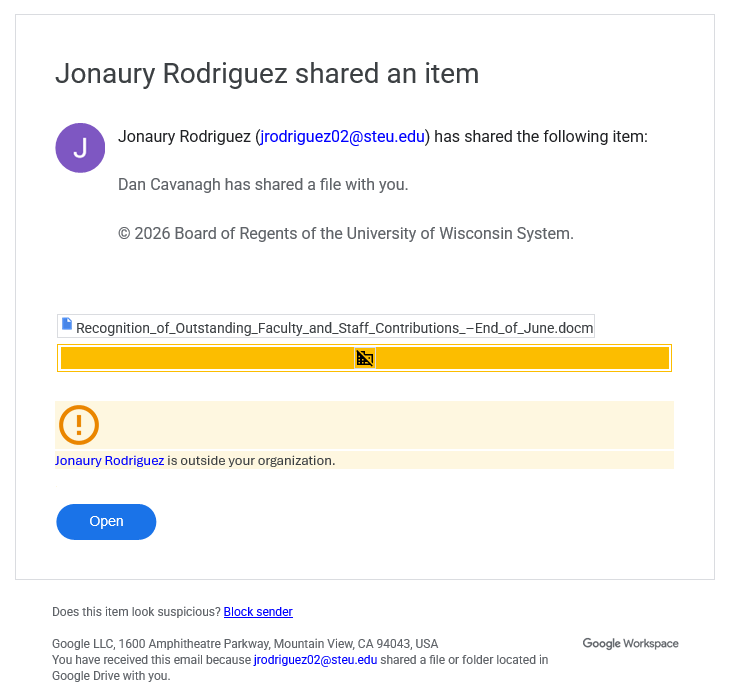
The Office of Cybersecurity has identified a significant phishing campaign that leans into our fiscal year pay increase and financial award timing. These malicious messages are timed to coincide with Workday communications and contain university-related themes and graphics. However, they are from a compromised account from outside our organization.
Scam email example
Please be on the lookout for an email that resembles the screenshot below. Note that it may come from a different ‘sender’. If you receive such an email, do not click on it. Instead, click the “Report Suspicious” button in Outlook.
How to report a phishing attempt
Outlook users:
To report phishing emails received via Outlook, click the “Report Suspicious” button on the toolbar/ribbon located at the top of your page. This action will send the questionable email to our security team for review.
Non-Outlook users:
If you are using any non-Microsoft email client (eg, Thunderbird, Apple Mail, Android/iOS native mail, etc), you will not see the “Report Suspicious” action button. However, it is still possible to report the message as spam/phishing by forwarding it to report-spam@doit.wisc.edu.
What else?
For additional information on how to avoid phishing, smishing, or other forms of scams, check out the following articles.