
Device compliance notifications coming to WiscVPN November 11
Beginning November 11, 2026, WiscVPN will show a notification when a connecting device does not meet university endpoint standards. The notification is informational: it explains what needs attention and links to step-by-step guidance for fixing it. No one will lose VPN access, or connectivity to any services, because of a notification, and departmental VPNs are not affected.
This article covers how we got here, what users will see, who is affected, and what IT staff can do to prepare.
How we got here
Since December 2025, Smart Access has been collecting device posture data on WiscVPN in audit mode, which evaluates devices without any user-facing change. Each step since then has followed the same approach: visibility first, then informed decisions, then intentional next steps.
- February 2026: We shared what the initial data showed. About 18% of devices connecting to WiscVPN fell short of the standard, most often because of missing operating system updates, and most of those were personally owned devices.
- March 31, 2026: Notifications were turned on for the DoIT VPN and the CALS Genetics VPN as a pilot. Russell Labs joined audit mode in June.
- Spring and summer 2026: The team completed an impact assessment with 11 schools, colleges, and divisions, surveyed people who received notifications, and updated notification language and KnowledgeBase (KB) guidance based on their feedback.
- August 2026: A recommendation to extend notifications to WiscVPN was finalized with DoIT leadership, and the November 11 date was set.
The pilot results were encouraging. Devices that received a notification were more than three times as likely to be updated as devices on WiscVPN, where no notification was shown. The impact assessment found low concern about a notification-only rollout when it is paired with proactive communication and support resources, which is the approach we are taking.
Smart Access Service principle in action – Adapt with Purpose: Notifications reach WiscVPN only after a pilot, a user experience survey, and an impact assessment. The evidence set the timing.
What users will see
When a device connects to WiscVPN through GlobalProtect, the client evaluates a small set of host information profile (HIP) signals. If the device does not meet the standard, GlobalProtect displays a notification with a brief explanation and a link to the KB article on fixing device compliance notices. The connection proceeds as usual.
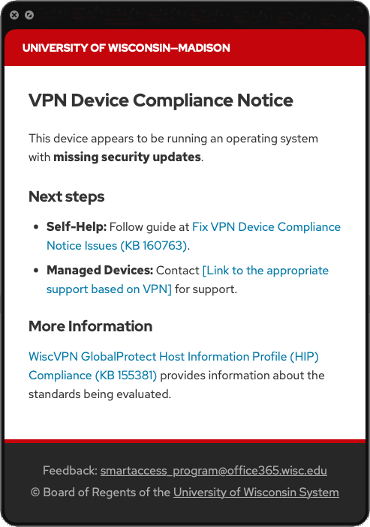
The checks follow UW-526 Endpoint Management and Security and its standards. A notification appears only when a device does not meet the standard’s low-risk level:
- The operating system is supported by its vendor
- Operating system updates are installed (no missing updates more than 90 days old)
- Antivirus or endpoint protection is installed, real-time protection is on, and definitions are up to date
The full set of checks is documented in WiscVPN GlobalProtect Host Information Profile (HIP) Compliance. Anyone who sees a notification can follow Fix VPN Device Compliance Notice Issues.
Who is affected
- Everyone who connects to WiscVPN. WiscVPN accounts for roughly half of GlobalProtect VPN use at UW-Madison, with more than 11,000 unique devices and 10,000 people connecting in June.
- University-managed devices that are kept current by DoIT Departmental Support or their local IT will generally not see a notification.
- Personally owned devices are the most likely to see a non-compliance notification. Roughly half of the devices on WiscVPN are personally owned, and the audit data show that missing updates are concentrated on those devices.
- Departmental VPNs are unchanged. This change applies to WiscVPN only.
Timeline
- September: Sharing the decision and timeline with IT audiences, including ITCCC, MIST, ITC, and the Endpoint Management Community of Practice.
- September to October: Updating KB articles and support documentation, and exploring options for reporting non-compliant devices to school, college, and division (SCD) IT units
- October: Sending SCD help desks a support package with handling guidance, troubleshooting steps, escalation paths, and communication templates
- Early November: Emailing all active WiscVPN users to announce the change and explain how to check a device ahead of time. Users whose devices currently show issues will receive additional guidance.
- November 11: Notifications turn on for WiscVPN
What IT staff can do now
- Review the KB articles above so you know what your users will see and what the fix steps are.
- If you manage devices, check them against the standard now. Keeping operating systems current and endpoint protection running covers the checks. The team has prototyped compliance reporting through BigFix, and Qualys and is investigating options for sharing non-compliant device reports with SCD IT units before rollout.
- Decide how your unit will handle requests for help with personal devices, which often fall outside normal departmental support.
- Watch for the SCD help desk package in October. It is designed to be adapted for your users and your support staff.
Smart Access Service principle in action – We’re All in This Together: The rollout plan came from what IT professionals told us during the impact assessment: communicate early, provide support resources ahead of time, and leave a preparation window before notifications turn on.
Why this matters
Knowing the condition of devices that connect to university resources is a foundation of the devices pillar of the CISA Zero Trust Maturity Model, and device compliance is one of Smart Access’s two priorities for 2026. Notifications are the step from visibility to measurable improvement. They reach people at the moment they connect, with specific guidance, and the pilot shows they work.
Frequently asked questions
Will I lose access to WiscVPN or connectivity to any services if my device is not compliant?
No. Notifications are informational only. Your connection proceeds, and the notification tells you what to fix and how.
Will this eventually be enforced?
This change is notification only, and enforcement on WiscVPN is not part of it. Any future step toward requiring device compliance for specific services would be a separate decision, made with campus input and communicated well in advance.
Why is the university doing this?
Devices are one of the most common ways attackers reach university systems, and the audit data showed that many devices on WiscVPN were missing updates. A notification at the moment of connection, with clear fix steps, is a small change that the pilot showed makes a measurable difference.
My device is personal. Does this apply to me?
Yes, if you connect to WiscVPN. The checks are the same for every device. Personal devices can usually be brought into compliance by installing pending updates and making sure the anti-virus protection is turned on. The KB has steps for each platform.
Does this apply to departmental VPNs?
No. This change applies to WiscVPN only. If your unit would like to see what device compliance data looks like on its own VPN, contact the Smart Access team.
How can my unit see the compliance of its devices?
The team is investigating options for reporting non-compliant devices to SCD IT units and will share more this fall.
Helpful Resources
- WiscVPN GlobalProtect Host Information Profile (HIP) Collection
- WiscVPN GlobalProtect Host Information Profile (HIP) Compliance
- Fix VPN Device Compliance Notice Issues
- UW-526: Endpoint Management and Security
- Endpoint Management and Security Policy Standards
Questions and feedback
Contact the Smart Access team.