5/7 Phishing alert: Subject line “Watchtower Notification: Security alert – suspicious sign-in attempt”
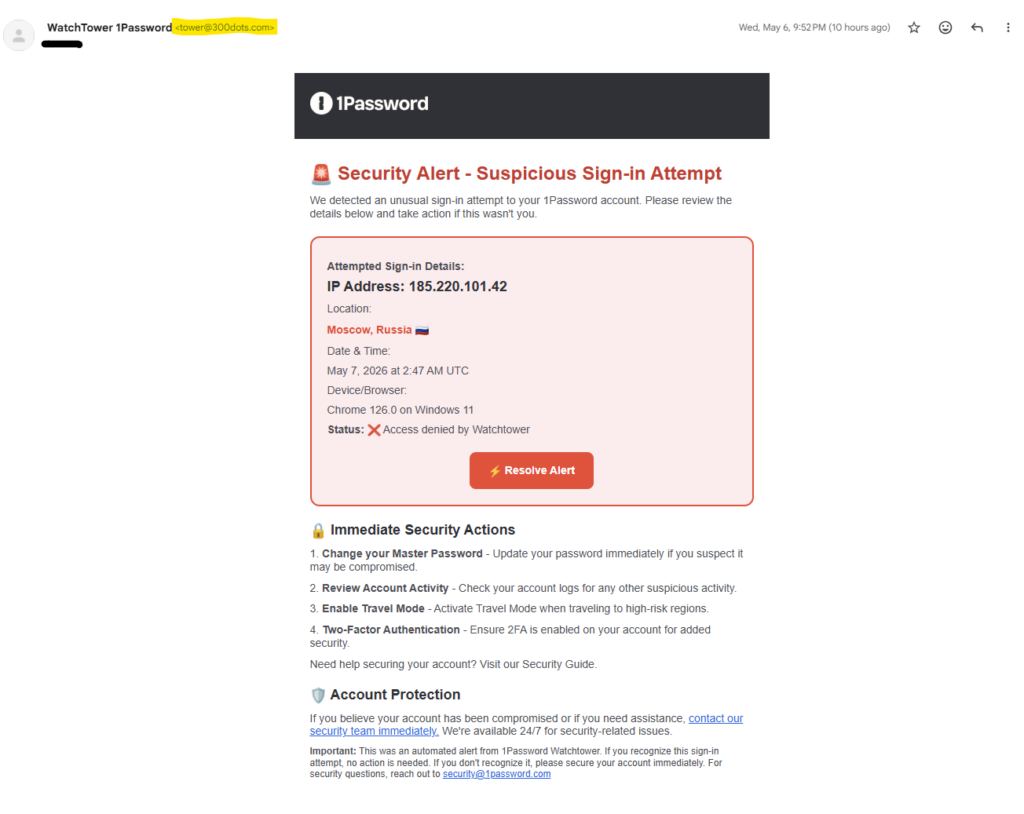
We received reports about an impersonation phish concerning Watchtower, a service by 1Password. The phish pretends that there was a suspicious sign-in attempt to your 1Password account and encourages you to click a fake Resolve alert button for more information.
This and similar phishing emails appear to come from a legitimate UW–Madison or vendor email addresses, and include urgent sounding requests. Unlike many phishing emails, this one uses good grammar and punctuation. Additionally, some people are receiving this phish to their personal email account–not just their @wisc.edu email address–so please be on guard.
Full message
How to Protect Yourself
- Verify the Sender: Always check the sender’s email address carefully. Look for any discrepancies or unusual domains.
- Be Cautious with Links: Do not click on any links in suspicious emails. Instead, hover over the link to see the actual URL.
- Confirm with the Source: If you receive a Watchtower message, check Watchtower yourself to confirm or deny its legitimacy.
- Report Suspicious Emails: If you receive a message like this, you can easily report it using the “report-suspicious” feature within the Office 365 web or desktop email client or by forwarding the email headers to abuse@wisc.edu.
If you are ever unsure whether an email message is legitimate, do not respond to it. Contact the DoIT Help Desk at 608-264-4357 for advice.
Read about other recent scams.