This page introduces taxonomies, what they are and how to use them, and how they differ from information architecture (IA) and navigation.
What are taxonomies?
A taxonomy is a list of approved words your team uses to describe content. It’s organized in a hierarchy—from broad topics to more specific ones. Taxonomies help keep your content organized and consistent.
A taxonomy is a controlled list, which means:
- You must choose from the terms provided
- You can’t make up new terms
- Everyone uses the same labels, the same way
Taxonomies are helpful when you want to:
- Improve search
- Make content easier to find
- Keep teams consistent
- Connect related topics
- Organize large content libraries
- Support filters or personalization
A taxonomy example
Imagine you’re tagging content about vehicles. A taxonomy might look like this:
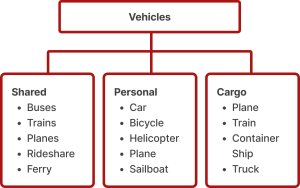
Each piece of content on your website could be tagged with one or more of these terms. Those tags help the website make smart decisions about what related content to show.
How do taxonomies, information architecture and navigation differ?
Although they’re related, taxonomy, information architecture (IA), and navigation serve different purposes:
Taxonomy
How we describe content
- A behind‑the‑scenes list of terms used to describe content.
- Not directly visible to users (though individual terms may appear as filters, tags, or search refinements)
Information architecture
How we organize content
- The structure of how your content is organized
- Defines site sections, hierarchies, and relationships
- Partially visible to users through navigation
Navigation
How users access content
- The user-facing representation of the IA
- What users see on the website: menus, categories, and links.
Why taxonomies matter
Taxonomies support both content creators and end users
- Better search
- A taxonomy helps search tools work smarter.
- Even if a user types a different word, the system can find content with related tags.
- Better organization
- Taxonomies help connect related content.
- If two articles share a tag, they can appear together or be recommended to users.
- Clear, consistent tagging
- Since everyone uses the same list of terms, the content stays clean and consistent.
Taxonomies help behind the scenes
Even though users don’t see the taxonomy, it helps:
- Group similar content
- Power filters, suggestions, and recommendations
- Make sure the website understands what each page is about
It acts like a “map of ideas” that keeps everything connected.
How to build a simple taxonomy
- Decide what you want to describe
- What types of content do you have?
- What will the taxonomy help you do?
- Collect possible terms from:
- Existing pages
- Search data
- User behavior
- Feedback from subject experts
- Sort the terms
- Group them into categories.
- Put broad terms at the top and more specific ones underneath.
- Test with real content
- Try tagging a few pieces of content.
- Is anything missing? Does anything feel confusing?
- Write simple rules to explain
- What each term means
- When to use it
- How to avoid duplicates
- Keep it updated
- Taxonomies evolve.
- Set a process for adding, removing, and reviewing terms.