
Color contrast is one of the 10 fundamental concepts that can support digital accessibility in all of your content.
Color contrast is the difference in brightness between text or important visuals and the background behind it. Proper color contrast ensures content can be read by people with low vision, color blindness, aging eyes, or when viewing on mobile devices or in bright environments.
Color should never be the only way information is communicated. If someone cannot perceive a color difference, they may miss the meaning entirely.
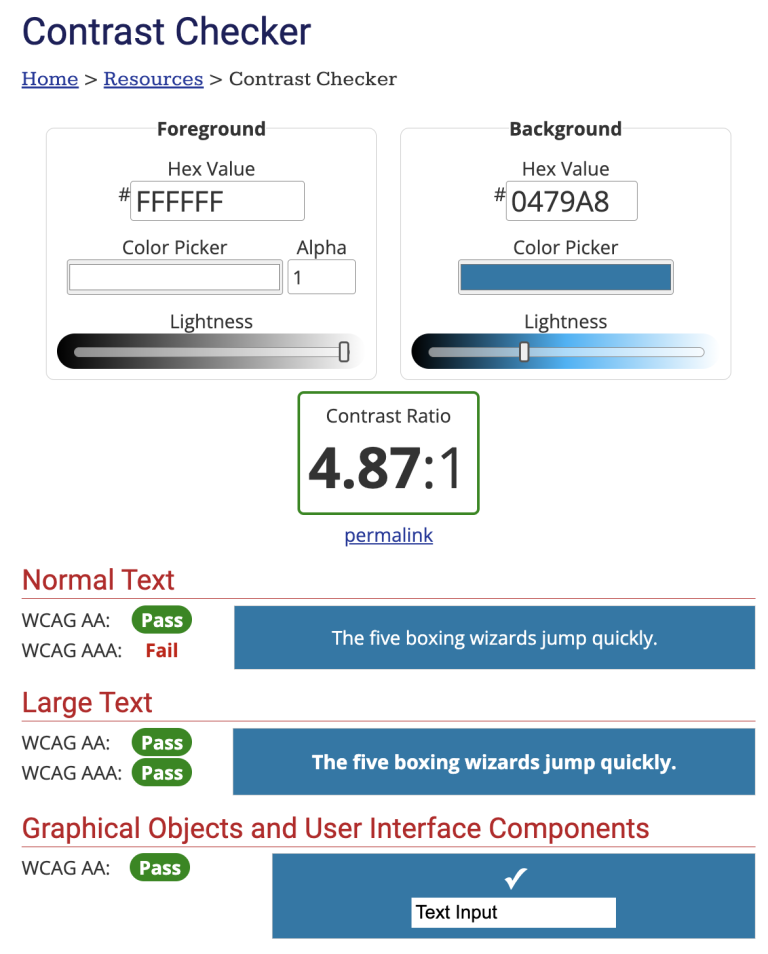
Use a tool like the WebAIM contrast checker to test the contrast ratio of your content. The Web Content Accessibility Guidelines (WCAG) 2.1 AA requires digital content meet the following minimum contrast ratios:
- Normal-size text – 4.5:1
- Large text (18+ pt font) – 3:1
- Interactive or graphic elements like icons, buttons, and text boxes – 3:1
The following images show the contrast checker results for a blue button labeled “Schedule appointment.” The button colors meet WCAG AA standards, which is sufficient for our compliance goals.

Even if text and element colors are distinguishable from the background, they may not always be distinguishable from each other. Avoid relying on color alone to communicate quick information, and include other indicators like text labels, patterns, and shapes.
- Use a contrast checker on text and other visual elements
- Minimum contrast ratios:
- Normal size text – 4.5:1
- Large text (18+ pt font) – 3:1
- UI elements like icons, buttons, text boxes – 3:1
- Minimum contrast ratios:
- Avoid using images behind text
- Use a solid-color background to get a better contrast ratio with text
- Avoid relying on color to convey information
Fundamentals









Download the checklist
Download our digital accessibility fundamentals checklist PDF to help you keep track of the core principles of accessibility while creating and editing digital resources.
The Center for User Experience
At the Center for User Experience, we are committed to working with you to make digital spaces more accessible, usable and inclusive for all students, faculty and staff at UW–Madison. We help the university follow its Digital Accessibility Policy by offering free evaluation and consultation services to all UW–Madison community members. For guidance on complying with digital accessibility requirements, visit Digital accessibility and the Americans with Disabilities Act (ADA).
Get in touch
- Meet with us: Book a quick chat with one of our team members to ask any questions you have.
- Start a project with us: We support accessible design and development. Fill out our Let’s Connect form to begin working with us on your project or to request an accessibility evaluation.
- Email us: Not sure if you’re ready to meet? Email us to start talking and figure out what to do next.